
Automated Invoice Inbox
Send your invoices to an inbox where data is automatically filled in; reducing manual file movement and manual data entry.
Desk and field. closer than ever.
Make collaboration seamless with your corporate card, expense management and our new AP invoice automation, all in one user-friendly platform.


Allan Lee
Chief Financial Officer
Peak Utility Services Group

Finvari's AP invoice automation is built for the way construction works. Finvari automatically extracts and validates invoice data, gives project reviewers an easy way to resolve questions and approve invoices from the field, and gives finance full visibility from intake through ERP.
Less keying. Less chasing. Automation from invoice to ERP.
The days of manual entry, miscommunication, and multiple confusing platforms are over. With Finvari’s AP invoice automation you can easily process thousands of invoices in a fraction of the time.
Send your invoices to an inbox where data is automatically filled in; reducing manual file movement and manual data entry.

Finvari checks invoices against your ERP data to help flag duplicates, overdue invoices, unusual amounts, and anything that needs a closer look.


Finvari extracts invoice header and line-item details automatically, helping your team review cleaner data without keying it by hand.


Invoices are routed using job data and approval rules already connected through your ERP.


Streamline invoice and card expense approvals in one field-friendly mobile app.

Our desktop and mobile app make collaboration seamless between your team in the office and your crew on the job site.
Send your invoices to an inbox where data is automatically filled in; reducing manual file movement and manual data entry.
Finvari checks invoices against your ERP data to help flag duplicates, overdue invoices, unusual amounts, and anything that needs a closer look.
Finvari extracts invoice header and line-item details automatically, helping your team review cleaner data without keying it by hand.
Invoices are routed using job data and approval rules already connected through your ERP.
Streamline invoice and card expense approvals in one field-friendly mobile app.
Our desktop and mobile app make collaboration seamless between your team in the office and your crew on the job site.
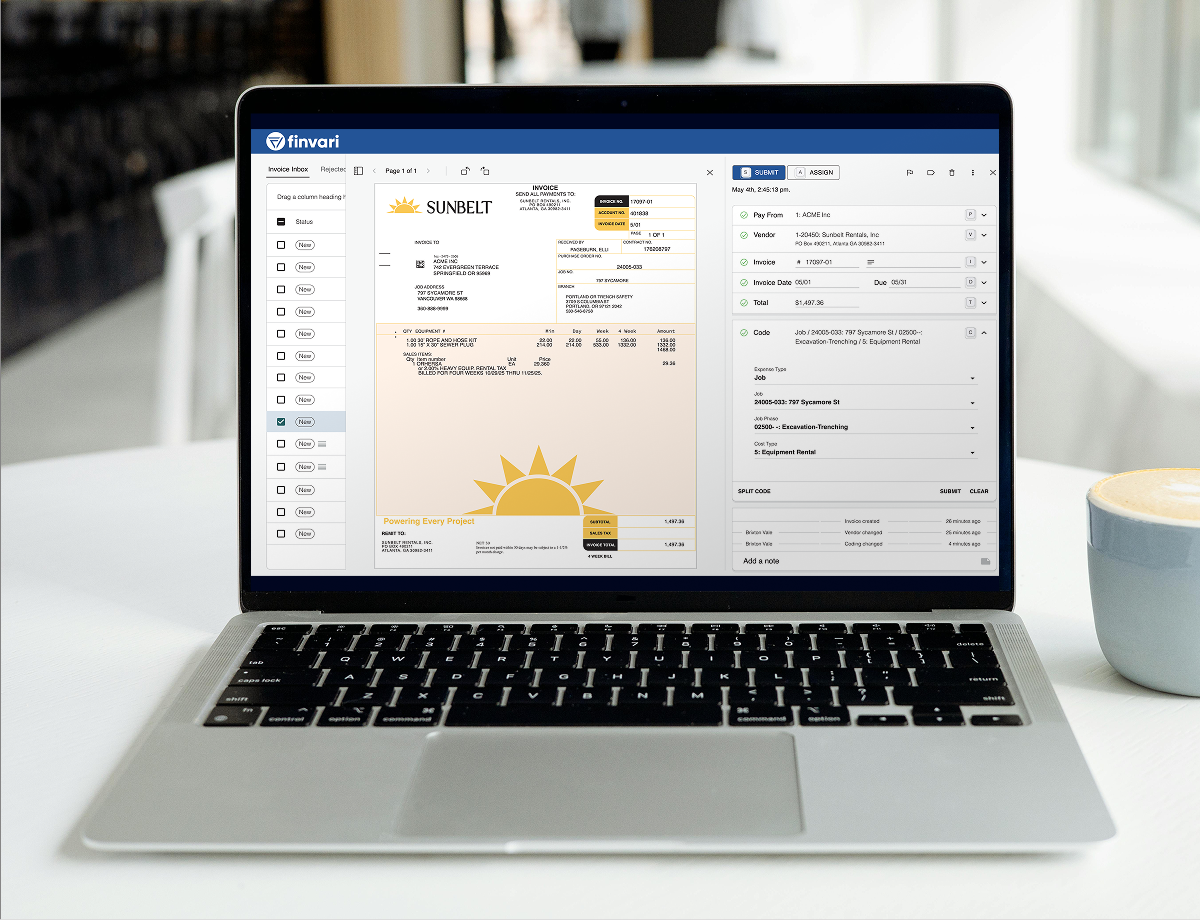
Capture, code, review, and sync card spend, expenses, and AP invoices to your ERP, all from one construction-specific platform.
AP invoice automation for construction uses software to streamline how contractors receive, validate, review, code, and approve vendor invoices. Unlike general AP tools, construction-focused AP automation accounts for job cost structures, project teams, cost codes, purchase orders, and construction ERP data.
Finvari helps contractors automate invoice workflows while keeping their ERP as the system of record. Finvari integrates with leading construction ERPs such as Viewpoint Vista, Viewpoint Spectrum, CMiC, Sage 300 Construction and Real Estate, Sage 100 Contractor, Sage Intacct, Foundation, Acumatica, COiNS, Computer Guidance/eCMS, ComputerEase, and Plexxis.
AP invoice automation reduces the manual work involved in downloading invoice attachments, manually entering invoice details, assigning job and cost information, manually assigning and tracking down approvers, and re-entering approved data into an ERP.
Finvari extracts invoice header and line item details, makes smart coding suggestions, validates invoice details against ERP data, and routes invoices to the appropriate reviewers. Reviewers can review and approve invoices directly from the Finvari mobile app, keeping approvals moving while they are in the field. Once approved, invoice data is pushed back to the ERP in real time. Once approved, invoice data is pushed back into the contractor’s ERP, helping finance teams process invoices faster and with fewer manual handoffs.
AP invoice automation is designed for vendor invoices, material invoices, equipment charges, and other accounts payable expenses. It typically includes invoice intake, data extraction, coding, validation, approval routing, and ERP synchronization.
Expense management focuses primarily on employee and corporate card spending, including receipts, transaction coding, and card controls.
Finvari brings corporate cards, expense management, and AP Invoice Automation into one platform built specifically for construction.
Yes. Contractors can receive invoices through a connected AP inbox within Finvari, centralizing invoice intake in one place. Finvari then extracts header and line-item details, flags invoices that need additional review, and suggests coding for faster review.
Finvari can also automatically route invoices to the appropriate approvers. Project managers and other reviewers can review and approve invoices from the same Finvari platform used for card and expense management, either on desktop or through the mobile app.
Finvari uses the contractor’s ERP as the system of record and validates invoice information. The platform can check for flags such as duplicate invoices, older invoices, unusual amounts, mismatched information, and invalid job or accounting data.
Finvari also uses ERP data such as vendors, jobs, phases, cost types, general ledger accounts, and employee roles to support coding, matching, and approval routing. This helps contractors identify potential errors earlier and keep approved invoice data aligned with their ERP.
